


Description
Download Driver Fusion – driver management, PC optimization, system performance, hardware control, driver backup, driver installation, driver removal
Overview
Driver Fusion is a utility application designed to streamline the management of PC drivers, addressing common challenges related to system stability and performance. The app enables users to install, remove, and restore drivers with minimal technical expertise, making it a valuable tool for both casual users and IT professionals. By simplifying the often complex process of driver maintenance, Driver Fusion helps prevent system slowdowns, hardware malfunctions, and compatibility issues that arise from outdated or corrupted drivers.
Target users include individuals managing personal computers, small business owners, and technical support personnel who require reliable tools for system upkeep. The application supports core tasks such as identifying outdated drivers, safely uninstalling them, and restoring previous configurations through backup functionality. This ensures system integrity and reduces the risk of errors during driver updates.
Although the developer did not provide additional technical details about their background or company structure, the app has been available since its release on September 29, 2015, indicating a long-standing presence in the PC optimization space. Real-world use cases include troubleshooting hardware recognition issues, preparing systems for upgrades, and maintaining consistent performance across multiple devices.
Within the broader ecosystem of system utilities, Driver Fusion fills a critical gap by offering a centralized interface for driver and hardware management, reducing reliance on fragmented tools or manual driver searches.
Key Features & Functionality
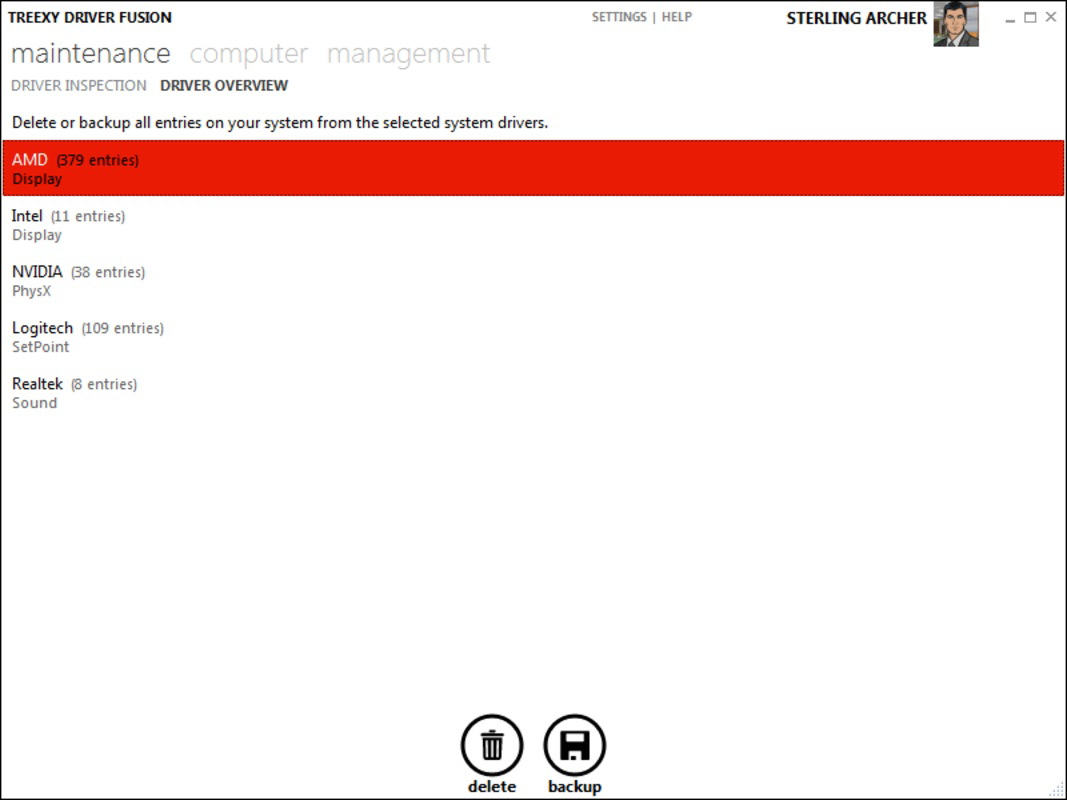
- User-Friendly Interface: The app features a clean and intuitive layout that allows users to navigate driver management tasks without prior technical knowledge. Options for installing, removing, or restoring drivers are clearly labeled and accessible from the main dashboard.
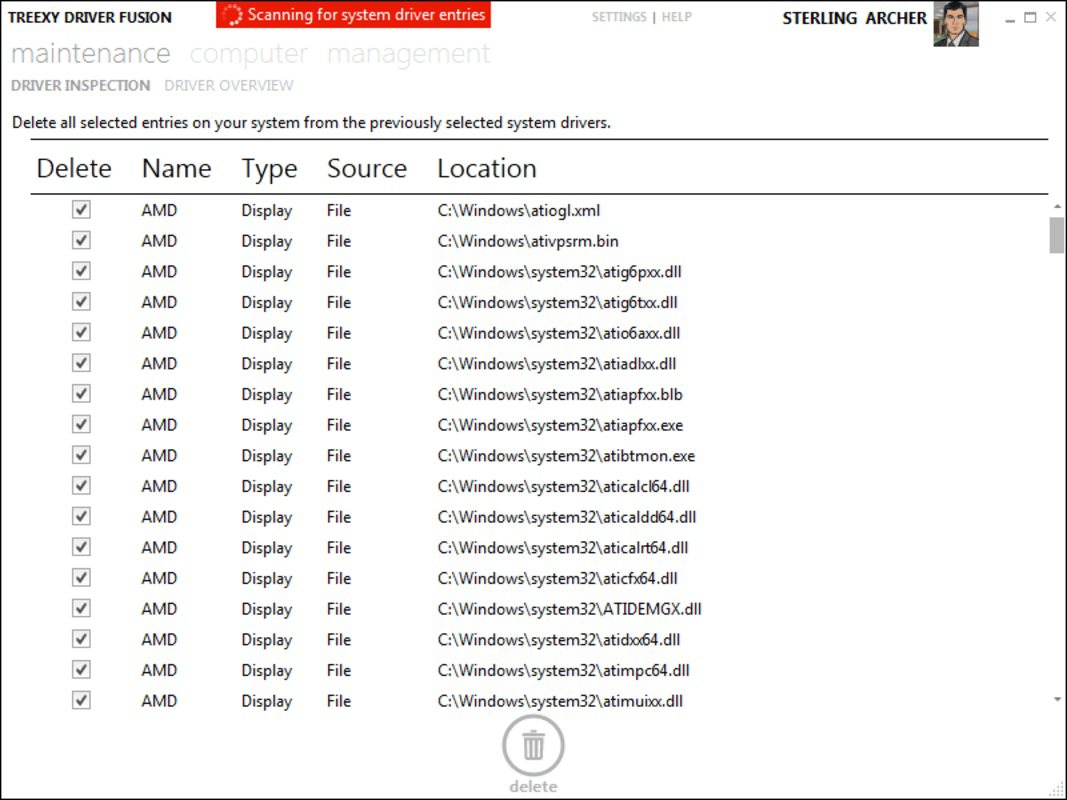
- Safe Driver Removal: Driver Fusion guides users through the process of identifying and safely removing outdated or conflicting drivers. This prevents system instability and reduces the risk of hardware malfunctions caused by incompatible software.
- Driver Backup Functionality: The application enables users to create comprehensive backups of installed drivers. This feature is particularly useful when upgrading operating systems or testing new drivers, as it allows for quick restoration of the previous configuration.
- Hardware Management Tools: Beyond driver control, the app provides functionality to activate or deactivate hardware components. This helps users optimize system resources, improve power efficiency, and troubleshoot peripheral connectivity issues.
- Reinstallation Options: Users can quickly reinstall drivers with a single command. This reduces downtime and simplifies recovery after system crashes, driver failures, or software updates.
For example, a user experiencing a malfunctioning graphics card can use Driver Fusion to identify the outdated driver, back it up, remove it safely, and reinstall the latest version—all within minutes. Similarly, IT administrators can use the app to standardize driver configurations across multiple workstations, ensuring consistency and reducing support requests.
Interface, UX & Performance
The user interface of Driver Fusion is designed with simplicity and clarity in mind. The main dashboard presents essential functions in a logically organized manner, minimizing cognitive load and enabling efficient task execution. Visual cues and status indicators help users track the progress of driver operations, such as backups or installations.
Navigational flow is straightforward, with a consistent layout that reduces the need for repeated learning. Menus and buttons are placed intuitively, allowing users to access key features without confusion. The app responds promptly to user inputs, ensuring a smooth interaction experience.
Although the developer did not list formal performance metrics, the application’s lightweight nature—measuring just 11.1 MB—suggests it imposes minimal strain on system resources. It is expected to run efficiently on a wide range of Windows devices, from older machines to modern systems. Responsiveness remains consistent during driver operations, and the app maintains stability even during lengthy processes like full driver backups.
Users can expect a reliable experience without frequent crashes or freezes, which is essential when managing critical system components. The interface remains functional and accessible throughout the entire workflow, contributing to a positive overall user experience.
Platform Compatibility & Technical Requirements
Driver Fusion is designed for the Windows operating system. The current version is 2.2.0.0, with a file size of 11.1 MB. This compact footprint indicates an efficient codebase optimized for performance and minimal storage usage.
The developer did not specify minimum OS requirements or compatibility details beyond the platform. As such, users should verify whether their version of Windows is supported before installation. While the app has been available since 2015, compatibility with newer Windows releases cannot be confirmed without official documentation.
Given its size and release date, the application may not include features tailored for the latest Windows updates or hardware advancements. Users are advised to check for updates or compatibility notes from the developer to ensure seamless integration with their system.
Pros and Cons
Pros
- Intuitive interface suitable for users of all technical levels
- Comprehensive driver backup and restoration capabilities
- Safe removal of outdated drivers to prevent system issues
- Centralized control over hardware components and drivers
- Lightweight design with minimal system impact
Cons
- Developer did not provide detailed system requirements
- Version release date is from 2015, raising questions about current compatibility
- No information on automatic update features
- Price point of $19.95 may be considered high for a utility with limited recent updates
- Limited transparency regarding ongoing development or support
FAQ
Is Driver Fusion safe to use?
Yes, the app is designed to manage drivers safely. It includes features like backup and verification to prevent system instability during driver changes.
Can I use Driver Fusion on older versions of Windows?
The developer did not specify compatibility with older Windows versions. Users should verify system requirements before installation.
Does Driver Fusion update drivers automatically?
Specific update automation features were not listed. The app allows manual installation and reinstallation, but automatic updates are not confirmed.
Is the app available for Mac or Linux?
Driver Fusion is only available for Windows. There is no official version for Mac or Linux systems.
How often should I back up my drivers?
It is recommended to back up drivers before major system changes, such as OS upgrades, hardware replacements, or driver updates, to ensure quick recovery if issues arise.
Final Thoughts + CTA
Driver Fusion offers a focused and practical solution for users seeking reliable driver management on Windows systems. Its clean interface, combined with essential tools like backup, removal, and reinstallation, makes it a dependable utility for maintaining system health. While the app’s last major update dates back to 2015, its core functionality remains relevant for users who prioritize stability and control over their PC’s drivers.
Although the lack of updated features and unclear compatibility details may deter some users, those who value simplicity and proven performance may find the app to be a worthwhile investment. It is especially beneficial for individuals managing multiple systems or those who prefer a no-frills approach to driver maintenance.
For anyone looking to enhance system performance, reduce technical issues, and gain greater control over hardware and drivers, Driver Fusion delivers tangible value. Download Driver Fusion now to take full command of your PC’s driver ecosystem.
Guides & Tutorials for Driver Fusion
How to install Driver Fusion
- Click the Preview / Download button above.
- Once redirected, accept the terms and click Install.
- Wait for the Driver Fusion download to finish on your device.
How to use Driver Fusion
This software is primarily used for its core features described above. Open the app after installation to explore its capabilities.
User Reviews for Driver Fusion 0
No reviews found


